Students today are under more pressure than ever—tight deadlines, complex subjects, and the constant need to stay productive. Artificial Intelligence (AI) tools have become powerful assistants that help students study smarter, save time, and improve results. In this article, you’ll find the best AI tools for students in 2026, including what they do, who they are best for, and how much they cost.
Why Students Should Use AI Tools
AI tools are no longer optional extras. They help students:
- Write assignments faster
- Understand difficult concepts
- Take better notes
- Prepare for exams efficiently
- Manage time and productivity
Whether you are in school, college, or university, the right AI tool can significantly reduce stress and improve academic performance.
1. ChatGPT – Best for Learning and Writing Help
ChatGPT is one of the most popular AI tools among students. It helps with explanations, summaries, essays, brainstorming ideas, and even coding basics.
Key Features
- Explains complex topics in simple language
- Helps write essays, emails, and reports
- Summarizes long chapters and articles
- Assists with homework questions
Best For
Students who need help understanding concepts, writing assignments, or revising topics quickly.
Pricing
- Free version available
- Paid plan offers advanced features and faster responses
2. Grammarly – Best for Grammar and Academic Writing
Grammarly is an AI-powered writing assistant that checks grammar, spelling, tone, and clarity in real time.
Key Features
- Grammar and spell checking
- Sentence clarity and rewriting suggestions
- Plagiarism detection (paid)
- Academic tone improvements
Best For
Students who write essays, research papers, emails, and assignments regularly.
Pricing
- Free basic plan
- Premium plan for advanced suggestions and plagiarism checks
3. Notion AI – Best for Notes and Study Organization
Notion AI helps students organize notes, plan studies, and manage projects efficiently.
Key Features
- AI-generated summaries
- Smart note-taking
- Task and study planning
- Converts messy notes into structured content
Best For
Students who want an all-in-one workspace for notes, planning, and studying.
Pricing
- Free version with limits
- Paid plans unlock full AI features
4. QuillBot – Best for Paraphrasing and Summarizing
QuillBot is widely used by students to rewrite content, avoid repetition, and summarize long texts.
Key Features
- Paraphrasing tool
- Summarizer
- Grammar checker
- Citation assistance
Best For
Students working on essays, research papers, and assignments that require rewriting or simplifying text.
Pricing
- Free plan with limitations
- Paid plan for faster processing and more modes
5. Otter.ai – Best for Lecture Notes
Otter.ai is an AI transcription tool that records and converts lectures into text automatically.
Key Features
- Live lecture transcription
- Audio-to-text conversion
- Searchable notes
- Speaker identification
Best For
Students who attend online or in-person lectures and want accurate notes without manual typing.
Pricing
- Free basic plan
- Paid plans for longer recordings and advanced features
Comparison Table of AI Tools for Students
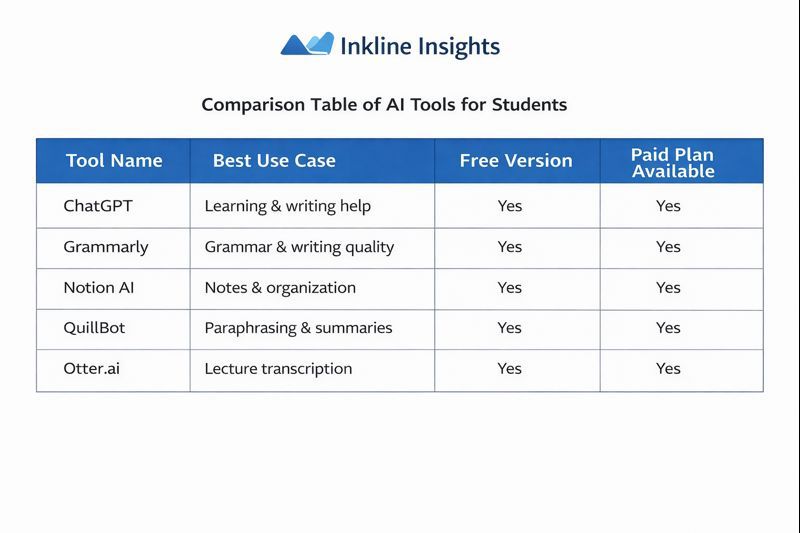
How to Choose the Right AI Tool
Ask yourself:
- Do I need help writing or understanding topics?
- Do I struggle with grammar or clarity?
- Do I want better notes and organization?
- Do I attend many lectures?
Choose one or two tools that match your biggest academic challenges.
Are AI Tools Safe for Students?
Yes, when used responsibly. AI tools should support learning, not replace it. Always review outputs, follow your institution’s guidelines, and avoid submitting AI-generated content without proper understanding or permission.
Final Thoughts
AI tools can be game-changers for students in 2026. With the right combination of tools, you can save time, improve grades, and reduce academic stress. Start with one tool that solves your biggest problem, master it, and then expand your toolkit as needed.
Used correctly, AI doesn’t make students lazy—it makes them smarter.
Leave a Reply